What is this?
Every website that updates routinely should have an RSS or Atom news feed that people (and search engines) can use to watch for changes.
By default, these files look horrible when a human looks at them in a browser. But there is a simple way to make them look better: RSS Style!
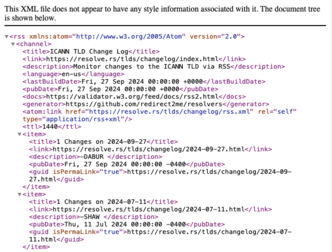
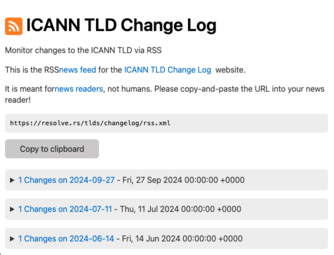
If you are not a webmaster, check out What is a feed? and Picking a news reader for how to get started!
How do I use it?
You need to know the name of your RSS/Atom file. It is usually something like feed.xml,
atom.xml or rss.xml.
You may be able to use the Feed Analyzer to help you find it. These examples use
feed.xml, but
you should replace it with the name of your feed file.
Add a line to your feed.xmlfile. At the top of the file, it will look like:
<?xml version="1.0" encoding="UTF-8"?>
<rss ...>
...
Add a line in the middle so it looks like:
<?xml version="1.0" encoding="UTF-8"?>
<rss ...>
<script src="https://www.rss.style/js/rss-style.js" xmlns="http://www.w3.org/1999/xhtml"></script>
...
If your feed is an Atom feed, it will be slightly different: <feed...> instead of <rss...> and the script will be atom-style.js
Questions and Answers
How does this work?
The <script> replaces the content with an XHTML version.
This is actually pretty neat: view-source shows the XML, but inspect-element shows the HTML. This has been supported
by
all major browsers for a quite awhile (20 years?).
Which file do I add it to?
Your feed file is often named feed.xml, but can be anything. You can
use the Feed Analyzer to find the URL of your feed: put in
your website's URL and it will display the feeds that it finds.
Can I host the scripts myself instead of hotlinking them?
If you don't trust me (probably a wise move on your part), you can download the scripts and host them yourself. They are MIT Licensed.
- rss-style.js - for RSS feeds (minified)
- atom-style.js - for Atom feeds (minified)
NOTE: The scripts are fresh out of the oven, so you still might want to hot-link them until they cool off.
If I host the scripts myself, how to I know when you make fixes and improvements?
Please follow the RSS.Style Changelog feed in your newsreader to get updates! It is also a good example of a feed styled with RSS.Style!
How do I customize the HTML content?
All of the content comes from settings in the feed itself.
| HTML Element | RSS Source | Atom Source | Notes |
|---|---|---|---|
| Icon | channel > image > url | feed > icon fallback to feed > logo |
Defaults to an RSS icon |
| Title (H1) | channel > title | feed > title | Also used in "for the Xxx Website" |
| Description | channel > description | feed > subtitle | |
| Hyperlink to the website | channel > link | feed > link > href that is not rel="self" |
Not hyperlinked if not found |
| Feed URL (for copying) | channel > atom:link's href attribute |
feed > link > href that is rel="self" |
Defaults to window.location.href if not found |
How do I customize the HTML style?
This is only for advanced users, since you will need to self-host the script and edit the code.
Once you have your own copy of the appropriate script, modify the link to https://www.rss.style/css/water.css to your new stylesheet.
Water.css is a "classless" stylesheet that does not require any class attributes on the
HTML elements, which is handy. You can drop-in any other classless
stylesheet, or you can add classes and use any other CSS framework you like.
NOTE: I would not fuss too much about the styling: it is meant to guide new users how to handle RSS/Atom feeds, not be a full page of your website.
Why am I still getting a wall of text? Or a download prompt?
Your web server needs to send the correct Content-Type header for your feed.
You need to use either text/xml or application/xml. It does not work with
application/rss+xml or application/atom+xml. The Feed Analyzer
will show what you are currently sending.
Why is there a flash of unstyled content (FOUC)?
The raw XML displays before the script kicks in. I haven't been able to figure out a way to get rid of it. I tried adding a CSS stylesheet, but that didn't seems to make much difference. Let me know if you have any ideas!
Why do my post bodies show up as raw HTML?
This is because the posts need to be XHTML. I'm not using a full HTML parser, so if there are any errors decoding or embedding the post body as XHTML, it will just be shown as raw text.
The most common reason for content to not be valid XHTML is unclosed <img> tags. Just put a slash
before the closing angle bracket: <img src="..." />.
Did you use AI to make this?
I have Github Copilot: I find it very useful as an "autocomplete on steroids". For example: when making the "Copy to clipboard" buttons, it filled in the entire snippet as soon as I typed ">but". But that doesn't really (IMHO) qualify as "written by AI".
I did try to use the "Agent" mode when converting from XSLT to Javascript. The solution it came up with did not work. After I was done, I went back and looked at what it had suggested, and it was very close, but got a key detail wrong (the correct XML namespace).
And if you look at the source for the Feed Analyzer, you'll think: No AI could possibly make code this bad...
Links
- Help! What is a feed? (About Feeds)
- Web feed on Wikipedia
- RFC 4287: The Atom Syndication Format
- RSS Advisory Board: RSS 2.0 specification
- All about RSS - A directory of RSS resources
- RSS Advisory Board: RSS 2.0 Best Practices
- RSS Feed Best Practises (Kevin Cox) - Everything except the
Content Type: onlytext/xmlworks across browsers. - XML.Style: XSLT links and resources
- How to style RSS feed (Lepture aka Hsiaoming Yang)
- Styling an RSS Feed With XSLT (Nat Clark)
- Adding a CSS StyleSheet to your RSS Feed (Pete Freitag)
Examples
| Website | News Feed | Notes | |
|---|---|---|---|
| Hacker News (front page) | before → after | Missing ‘self’ link, No link in home page body. analyze | |
| Hacker News (Show HN) | before → after | Title doesn’t have ‘Show HN’. Missing ‘self’ link. No discovery link. analyze | |
| Fly.io | before → after | Bad ‘self’ link. HTML page is missing the discovery link analyze | |
| Jacques Mattheij | before → after | Bad ‘self’ link (404) analyze | |
| Dave Winer | before → after | Missing the ‘self’ link. No link in home page body. analyze | |
| Dan Nguyen | before → after | Opens ‘Save As’ in Firefox. (also no https: support) analyze | |
| Thomas Schranz | before → after | Different ‘self’ link is different, though it works. No link in home page body. analyze | |
| Colin Wright | before → after | Already has styling! CSS. No discovery link. analyze | |
| Hillel Wayne | before → after | Opens ‘Save as’ dialog in Firefox. Mismatched discovery link. No link in home page body. analyze | |
| Patrick McKenzie | before → after | No link in home page body. analyze | |
| Allen Downey | before → after | Opens ‘Save as’ dialog in Firefox. Home page link has a redirect. No link in home page body. analyze | |
| Julia Evans | before → after | Self and home page links are ‘http:’ analyze | |
| Thomas Park | before → after | Opens ‘Save as’ dialog in Firefox analyze | |
| Kyle Kingsbury | before → after | Opens ‘Save as’ dialog in Firefox. No link in home page body. analyze | |
| Mark Nottingham | before → after | Opens ‘Save as’ dialog in Firefox. analyze | |
| Tim Bray | before → after | Opens ‘Save as’ dialog in Firefox analyze | |
| John Graham-Cumming | before → after | CSS stylesheet, but insecure so it doesn’t work. Mismatched ‘self’ link but working. analyze | |
| Dan Luu | before → after | Bad ‘self’ link. Bad home page link. No title. analyze | |
| Steve Klabnik | before → after | Missing the ‘self’ link. No link in home page body. analyze | |
| Stavros Korokithakis | before → after | Uses RSS.Style for the win!!! analyze | |
| Terence Eden | before → after | Has styling, but not exactly pretty. Home page link has a redirect. analyze | |
| Chris Coyier | before → after | Opens ‘Save as’ dialog in Firefox. analyze | |
| Anil Dash | before → after | Links use naked domain, but website is at www analyze | |
| Daring Fireball | before → after | Not linked from home page, Last-Modified header is ‘now’ analyze | |
| Gwern | before → after | Not linked from home page analyze | |
| Marco Arment | before → after | Missing ‘self’ link analyze | |
| Addy Osmani | before → after | Mismatched ‘self’ link, two identical link headers analyze | |
| Jason Kottke | before → after | Home page rel-link uses http: analyze | |
| Chris Dixon | before → after | Missing ‘self’ link analyze | |
| Simon Willison | before → after | Self and home links use http: analyze | |
| Scott Helme | before → after | Domain mixup with ghost.io analyze | |
| Avery Pennarun | before → after | Missing logo and ‘self’ link analyze | |
| Logo of the day | before → after | Perfect, since it is my sample for testing. analyze | |
| RSS.Style Changelog | before → after | analyze | |
| Try it on your own feed! | Problems?Feed Analyzer | ||